Dataverse ConnectionString cannot be null or empty
Error message (sample)
The portal returns an error indicating the Dataverse connection string is missing. Example (redacted):
{
    "message": "An error occurred while syncing the business objects: POST to 'URL/api/metadata/tables?loglevel=Error' failed with BadRequest :: { <redacted payload> }",
    "errors": [
        "An error occurred while syncing the business objects: POST to 'URL/api/metadata/tables?loglevel=Error' failed with BadRequest :: { <redacted payload> }"
    ]
}
Symptoms
- Portal shows an error when attempting to sync business objects.
Scope
Occurs on both the SaaS Model and Customer Hosted Model.
Known instances
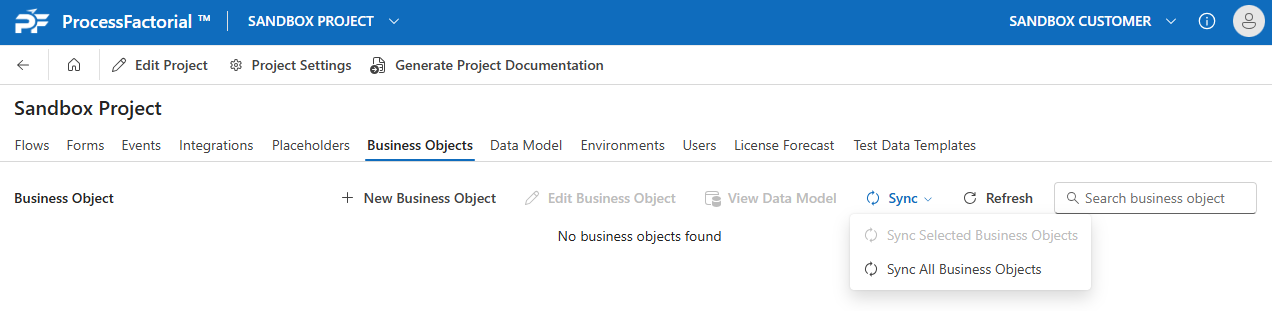
Data Model Sync
When the portal user attempts to do a sync of the data model:
Root cause
The Connection String for Microsoft DataVerse has not been configured, or the client secret is invalid or expired.
Resolution
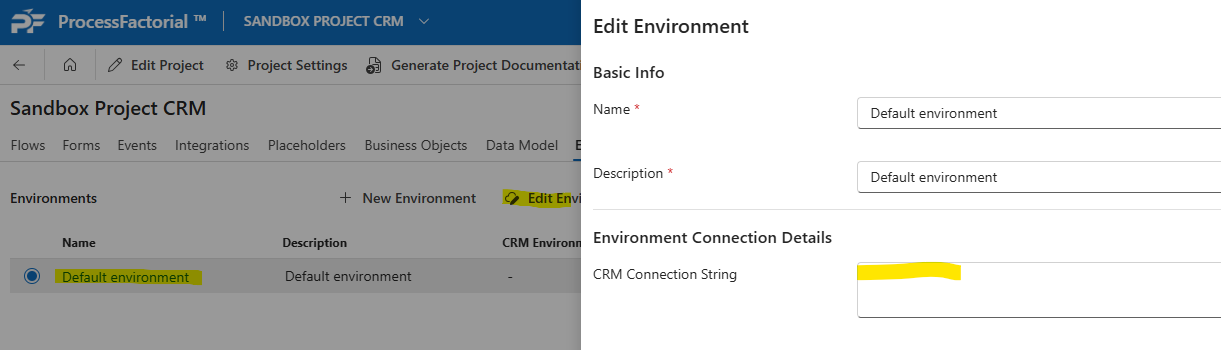
Ensure the connection string to Microsoft DataVerse is configured and valid. Verify the Key Vault secret is present and not expired. For data model sync use the Default Power Platform environment; for other interactions use the relevant target environment (Dev/Test/Prod).
Verification checklist
- [ ] Dataverse connection string present and valid
- [ ] Client secret is present and not expired
- [ ] Sync succeeds without the BadRequest error