Dependency Failure when accessing a resource
Error message (sample)
Dependency failures in App Insights often show HTTP 401 responses; there may be no detailed message in telemetry.
Symptoms
- App Insights shows dependency failures with status
401. - You may see short-lived failures followed by a successful retry (
200).
Scope
This can occur on both SaaS Model and Customer Hosted Model installations.
Known instances
KeyVault
Key Vault may show a failure immediately followed by a success (200) when a token is refreshed.

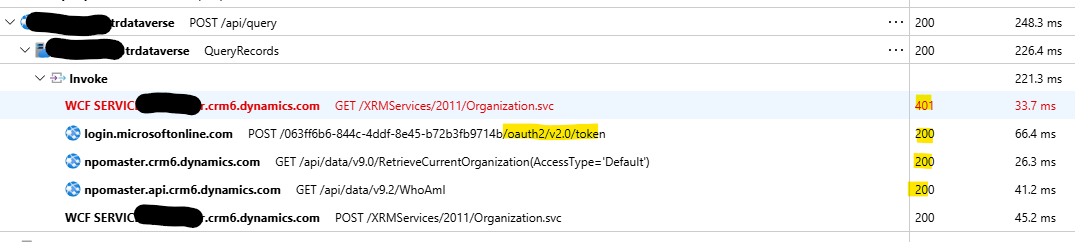
Microsoft DataVerse
When function apps connect to Microsoft DataVerse a token refresh may produce a transient failure, then a successful retry.
Root cause
This typically happens when a Managed Identity token has expired or is about to expire; the call fails, the token is refreshed, and the operation is retried successfully.
Resolution
This is often expected behaviour; however:
- Open the dependency failure details in App Insights to confirm a successful retry shortly after the failure.
- Investigate excessive failure volumes (many failures per day) as they indicate an authentication issue (expired/invalid secret, credentials, or configuration).
- Consider scaling and token expiry patterns — each instance may refresh tokens independently.
Verification checklist
- [ ] Dependency failures are transient and followed by a success
- [ ] No excessive failure volume for the same dependency
Notes and references
- See General App Insights Guidelines for broader guidance on handling telemetry and suppressing noise.