Configuration Security Roles
This article outlines the security options for configuration users on the ProcessFactorial Portal
Security Layers
The ProcessFactorial Portal has three layers of security. Each layer requires that the user also has access to the layer above in some form
Customer Level Permissions
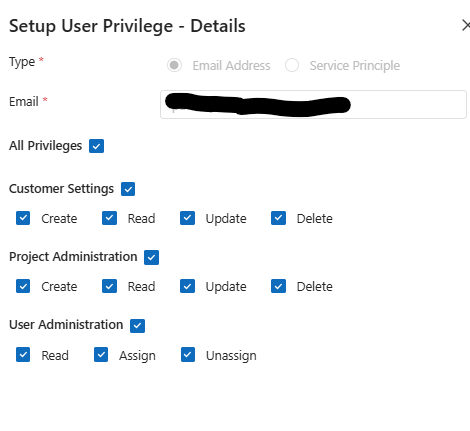
This is the top-most level. This allows users to access the general customer information and basic project visibility
| Privilege | Permission | Purpose | Minimum Recommended Permission |
|---|---|---|---|
| Customer Settings | Create, Read, Update, Delete | Allows users to modify or read the customer name and description | Read |
| Project Administration | Create, Read, Update, Delete | Allows users to create, read or modify projects. This permission is needed if the user will be creating new projects. Typical configurators should not be able to create new projects | Read |
| User Administration | Read, Assign, Unassign | Allows users to read, assign new or remove existing user access. Only administrators should have Assign and Unassign access | Read |
 |
Project Level Permissions
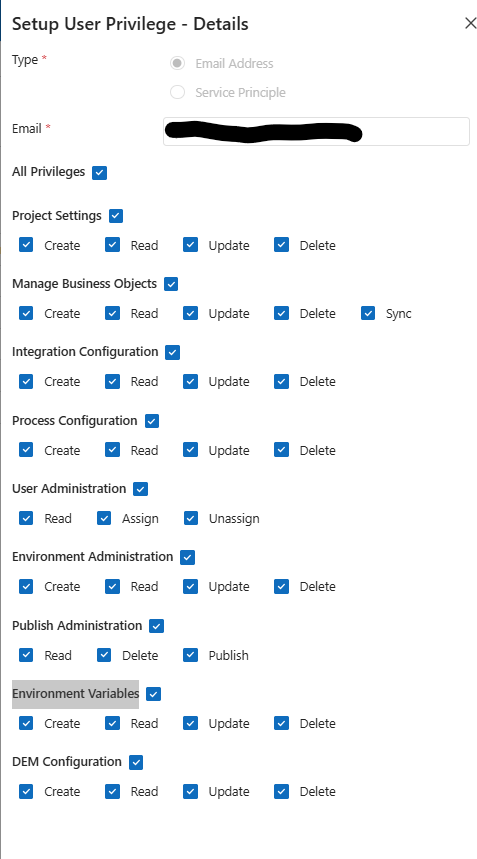
This role is used for administration of the project, configuration of Flows, Forms and Integrations.
Users with this role must first belong to the #Customer Role above.
| Privilege | Permission | Purpose | Minimum Recommended Permission |
|---|---|---|---|
| Project Settings | Create, Read, Update, Delete | Allows users to modify or read the project name, description and other configuration settings | Read |
| Manage Business Objects | Create, Read, Update, Delete, Sync | Allows users to maintain the business objects (tables) on the platform. If the metadata is being maintained in the Data Store, meaning that users will not be modifying the tables and fields in the ProcessFactorial Portal, then users should not have Create, Update or Delete permissions. The sync permission allows the user to sync the metadata in the Data Store with the ProcessFactorial Portal |
Read |
| Integration Configuration | Create, Read, Update, Delete | Allows users to configure integrations. This is a core configuration role | Read |
| Process Configuration | Create, Read, Update, Delete | Allows users to configure flows. This is a core configuration role | Read |
| DEM Configuration | Create, Read, Update, Delete | Allows users to configure forms. This is a core configuration role | Read |
| User Administration | Read, Assign, Unassign | Allows users to read, assign new or remove existing user access. Only administrators should have Assign and Unassign access | Read |
| Environment Administration | Create, Read, Update, Delete | Allows users to create and maintain NPO Environments for this project. Only administrators should have Create, Update and Delete access | Read |
| Publish Administration | Read, Delete, Publish | Allows a configurator to publish a Factorial Flow, Factorial Form or Integration Typically most configurators will have this permission to test their configurations | Read |
| Environment Variables | Create, Read, Update, Delete | Allows configurators to create and maintain NPO Placeholder values at configuration level. | Read |
 |
Environment Level Permissions
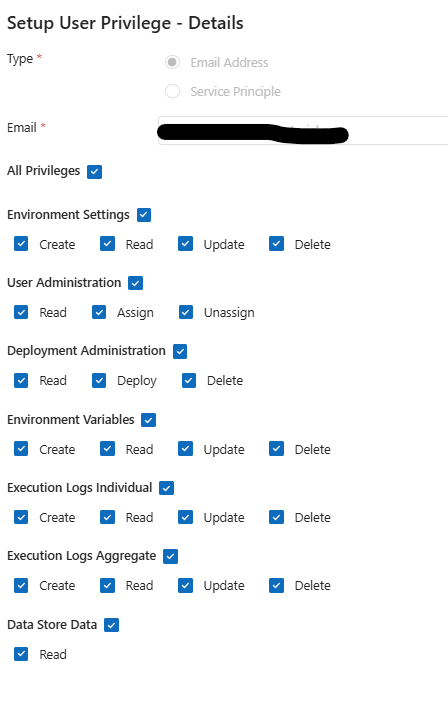
This role is used for administration of NPO Environments and deployment of artifacts.
Every environment has it's own permissions. This allows the administrators to allow configurators to deploy to only certain environments, such as development, but not to others such as production
Users with this role must first belong to the #Project Role above.
Data Store Data permission
This permission will allow the user to read data from the target Data Store with the same security role as the user configured to connect to the Data Store via the Link to Environment page. It is strongly recommended that configurators only have this permission on non-production systems
| Privilege | Permission | Purpose | Minimum Recommended Permission |
|---|---|---|---|
| Environment Settings | Create, Read, Update, Delete | Allows users to modify or read the environment name, description and update other settings such as connection strings | Read |
| Deployment Administration | Read, Deploy, Delete | Allows users to deploy published artifacts to this environment | None |
| Environment Variables | Create, Read, Update, Delete | Allows users to maintain NPO Placeholder values at an environment level | None |
| Execution Logs Individual | Read | Allows users to see individual execution report for a single execution | Read |
| Execution Logs Aggregate | Read | Allows users to see aggregate, non-identifiable, execution metrics | Read |
| Data Store Data | Read | Allows user to read data from the Data Store This will use the user permissions configured in the Link to Environment page. | Read * |
| User Administration | Read, Assign, Unassign | Allows users to read, assign new or remove existing user access. Only administrators should have Assign and Unassign access | Read |
 |
Recommended Roles
This section outlines typical roles of users and what permissions each role should have.
Any permissions not listed should default to the minimum recommended permissions in the #Security Layers above
When it comes to the NPO Environments, each environment's access needs to be considered individually. For example, configurators will need to deploy to a development environment, but not to a production environment
| Role | Purpose |
|---|---|
| All Access | Basically a global administrator |
| Minimum | Minimum rights for someone to have read only access to the resources |
| Administrator | Creates and maintain customers, projects and environments only |
| Configurator | Core business user that uses the ProcessFactorial Portal to do configuration and testing |
| Deployment Administrator | Manages deployments to upstream environments, including production |
| ### All Access | |
| Level | Privilege |
| ----------- | -------------------------- |
| Customer | Customer Settings |
| Project Administration | |
| User Administration | |
| Project | Project Settings |
| Manage Business Objects | |
| Integration Configuration | |
| Process Configuration | |
| DEM Configuration | |
| User Administration | |
| Environment Administration | |
| Publish Administration | |
| Environment Variables | |
| Environment | Environment Settings |
| Deployment Administration | |
| Environment Variables | |
| Execution Logs Individual | |
| Execution Logs Aggregate | |
| Data Store Data | |
| User Administration |
Minimum
| Level | Privilege | Create | Read | Update | Delete | Assign Unassign |
Publish Deploy Sync |
|---|---|---|---|---|---|---|---|
| Customer | Customer Settings |  |
 |
|
|
 |
|
| Project Administration | |
|
|
|
|
|
|
| User Administration | |
|
|
|
|
|
|
| Project | Project Settings | |
|
|
|
|
|
| Manage Business Objects | |
|
|
|
|
|
|
| Integration Configuration | |
|
|
|
|
|
|
| Process Configuration | |
|
|
|
|
|
|
| DEM Configuration | |
|
|
|
|
|
|
| User Administration | |
|
|
|
|
|
|
| Environment Administration | |
|
|
|
|
|
|
| Publish Administration | |
|
|
|
|
|
|
| Environment Variables | |
|
|
|
|
|
|
| Environment | Environment Settings | |
|
|
|
|
|
| Deployment Administration | |
|
|
|
|
|
|
| Environment Variables | |
|
|
|
|
|
|
| Execution Logs Individual | |
|
|
|
|
|
|
| Execution Logs Aggregate | |
|
|
|
|
|
|
| Data Store Data | |
|
|
|
|
|
|
| User Administration | |
|
|
|
|
|
|
| ### Administrator |
Manages the platform. Does not do any configuration. Will have the below permissions for every available environment, including production
| Level | Privilege | Create | Read | Update | Delete | Assign Unassign |
Publish Deploy Sync |
|---|---|---|---|---|---|---|---|
| Customer | Customer Settings | |
|
|
|
|
|
| Project Administration | |
|
|
|
|
|
|
| User Administration | |
|
|
|
|
|
|
| Project | Project Settings | |
|
|
|
|
|
| Manage Business Objects | |
|
|
|
|
|
|
| Integration Configuration | |
|
|
|
|
|
|
| Process Configuration | |
|
|
|
|
|
|
| DEM Configuration | |
|
|
|
|
|
|
| User Administration | |
|
|
|
|
|
|
| Environment Administration | |
|
|
|
|
|
|
| Publish Administration | |
|
|
|
|
|
|
| Environment Variables | |
|
|
|
|
|
|
| Environment | Environment Settings | |
|
|
|
|
|
| Deployment Administration | |
|
|
|
|
|
|
| Environment Variables | |
|
|
|
|
|
|
| Execution Logs Individual | |
|
|
|
|
|
|
| Execution Logs Aggregate | |
|
|
|
|
|
|
| Data Store Data | |
|
|
|
|
|
|
| User Administration | |
|
|
|
|
|
|
| ### Configurator |
Configures Flows, Forms and Integrations. Will typically only have access to a development and maybe a test environment, but no access to a production environment (no permissions at all).
For Manage Business Objects, if the metadata is only being sourced from the target Data Store, only give Read and Sync access
| Level | Privilege | Create | Read | Update | Delete | Assign Unassign |
Publish Deploy Sync |
|---|---|---|---|---|---|---|---|
| Customer | Customer Settings | |
|
|
|
|
|
| Project Administration | |
|
|
|
|
|
|
| User Administration | |
|
|
|
|
|
|
| Project | Project Settings | |
|
|
|
|
|
| Manage Business Objects | |
|
|
|
|
|
|
| Integration Configuration | |
|
|
|
|
|
|
| Process Configuration | |
|
|
|
|
|
|
| DEM Configuration | |
|
|
|
|
|
|
| User Administration | |
|
|
|
|
|
|
| Environment Administration | |
|
|
|
|
|
|
| Publish Administration | |
|
|
|
|
|
|
| Environment Variables | |
|
|
|
|
|
|
| Environment | Environment Settings | |
|
|
|
|
|
| Deployment Administration | |
|
|
|
|
|
|
| Environment Variables | |
|
|
|
|
|
|
| Execution Logs Individual | |
|
|
|
|
|
|
| Execution Logs Aggregate | |
|
|
|
|
|
|
| Data Store Data | |
|
|
|
|
|
|
| User Administration | |
|
|
|
|
|
Deployment Administrator
Deploys published artifacts to a specific environment
| Level | Privilege | Create | Read | Update | Delete | Assign Unassign |
Publish Deploy Sync |
|---|---|---|---|---|---|---|---|
| Customer | Customer Settings | |
|
|
|
|
|
| Project Administration | |
|
|
|
|
|
|
| User Administration | |
|
|
|
|
|
|
| Project | Project Settings | |
|
|
|
|
|
| Manage Business Objects | |
|
|
|
|
|
|
| Integration Configuration | |
|
|
|
|
|
|
| Process Configuration | |
|
|
|
|
|
|
| DEM Configuration | |
|
|
|
|
|
|
| User Administration | |
|
|
|
|
|
|
| Environment Administration | |
|
|
|
|
|
|
| Publish Administration | |
|
|
|
|
|
|
| Environment Variables | |
|
|
|
|
|
|
| Environment | Environment Settings | |
|
|
|
|
|
| Deployment Administration | |
|
|
|
|
|
|
| Environment Variables | |
|
|
|
|
|
|
| Execution Logs Individual | |
|
|
|
|
|
|
| Execution Logs Aggregate | |
|
|
|
|
|
|
| Data Store Data | |
|
|
|
|
|
|
| User Administration | |
|
|
|
|
|