Dependency Failure when accessing a resource
Description
App Insights show Dependency Failures, typically as 401 errors.
Scope
This error can happen on SaaS Model and Customer Hosted Model installations
Error Message
There may not be an error message, but the response code will be `401
Known Instances
KeyVault
KeyVault will typically show the failure, immediately followed by a success response (200). App Insights may or may not show the token refresh request prior to the retry.

Microsoft DataVerse
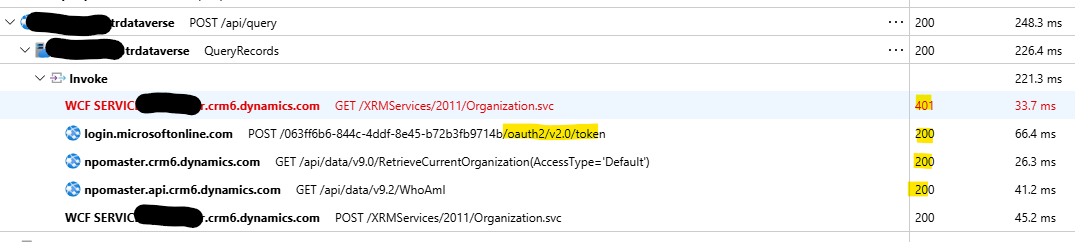
When one of the function apps attempts to connect to Microsoft DataVerse and this dependency fails, it will typically show the token refresh, followed by a successful retry (200)
Cause
This error happens when a Managed Identity is used to access a particular resource, but the identity token has expired or is about to expire. Typically this will refresh the token and then retry the operation. The second operation then succeeds
Resolution
Note
This is typically normal as the token will periodically expire, get refreshed, and then succeed. See General App Insights Guidelines for more details
However, pay attention to excessive volume, which could mean that the authentication parameters may no longer be valid. How much is excessive is relative. For example, a KeyVault request could fail this dependency 50 or 60 times a day. A connection to a Microsoft DataVerse instance could fail this dependency 100s of times a day.
If your instances of the relevant function apps are scaled out to multiple instances, each instance may have it's own token expire independently of the others. So large scaled environments may actually legitimately have many multiples of the above estimates.
We have found that an expired secret to a Microsoft DataVerse platform could fail 5,000 times a day. This would be excessive and is indicative of a problem.
The best way to troubleshoot is to open the dependency failures in App Insights and see if the same request succeeded shortly afterward.
Some valid failures include: - The secret has expired or is not valid - The Username or Password is not valid
It is possible to suppress 401 errors in App Insights, but be careful that this does not also remove valid 401 errors.