Replay Protection
permalink: customerhostedreplayprotection
Introduction
This article outlines the types of replay protection available on the ProcessFactorial platform. Replay protection checks happen on the Portal Backend (npobp_portalbackend) proxy.
Types of Protection
In each of the following, a 401 response will be returned with one of the following errors:
Missing or malformed Authorization header- `Malformed token or missing expiration
Token replay detectedInvalid or expired token
JWT Token Replay Protection With IP
This will detect a change in IP address when using a specific IP Address. So long as the IP Address remains the same for the life of the JWT Token, the request will be successful. This is the recommended protection for most of the services we provide.
JWT Token Replay Protection Without IP
Warning
A fresh JWT token is required for every request to the API. This could lead to additional stress on your preferred authentication services.
This only allows a JWT Token to be used once. This means that every single request needs a new JWT token. For most scenarios this is overkill, but for integrations that contain sensitive information, such as financial transactions, this protection is recommended.
Enabling Replay Protection
One or more Portal Backend (npobp_portalbackend) services can be deployed as part of the ProcessFactorial Customer Hosted Model It is also possible to reuse a single Portal Backend (npobp_portalbackend) for for more than one purpose.
These are the typical use cases for routing through the Portal Backend (npobp_portalbackend):
- All interaction from the ProcessFactorial Portal via the /api endpoint (except for the test Factorial Form)
- All interactions from the test Factorial Form via the /testharnessapi endpoint
- All interactions from the deployed Factorial Form via the /demapi endpoint
Note
The instructions below assumes a single Portal Backend (npobp_portalbackend) For more than one backend, simply split the setting values across the different backend services
- In the Azure Portal, browse to the Portal Backend (npobp_portalbackend) and then open the Environment Variables
- Verify the
VALID_INPUT_PATHSthat are configured for this service. It should contain one or more of the endpoints described above, semi-colon separated - Verify that each of the configured
VALID_INPUT_PATHSalso has a correspondingAPI_KEY_VALUESsetting, semi-colon separated. The key needs to have the same index in the semi-colon separated string - For each of the APIs in the
VALID_INPUT_PATHS, do the following:- If requiring #JWT Token Replay Protection With IP, add to setting
TOKEN_PROTECTED_PATHS_WITH_IP(semi-colon separated) - If requiring #JWT Token Replay Protection Without IP, add to setting
TOKEN_PROTECTED_PATHS_WITHOUT_IP(semi-colon separated) - If no replay protection is required, don't add the API path anywhere.
- If requiring #JWT Token Replay Protection With IP, add to setting
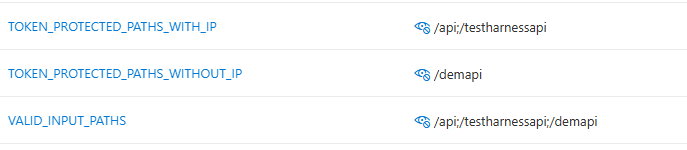
This example shows where the /api and /testharnessapi` requires #JWT Token Replay Protection With IP, the deployed Forms require #JWT Token Replay Protection Without IP
Note
Regardless of the examples above, we recommend that all the APIs are secured as TOKEN_PROTECTED_PATHS_WITH_IP
