Performance Considerations
permalink: customerhostedperformanceconsiderations
This page outlines the scalability options available for the ProcessFactorial when running as a Customer Hosted Model When using the SaaS Model, all these are automatically taken care of by NPO Factorial
Also see [[{DRAFT}Sequence Diagrams]]
Introduction
The first step to scaling the ProcessFactorial is to identify where the bottleneck exists.
The ProcessFactorial is optimised to maximise the performance at execution time (see Execution Processing). This means that some heavy lifting happens at configuration, publish or deploy time to pre-process any configuration components for consumption. Generally scaling should only be needed for execution components, but there will be fringe use cases where scaling Configuration Processing components.
The ProcessFactorial aims to minimise requests to the Data Store by using smart querying and data caching where relevant. However, there is always a risk that the Data Store is a bottleneck. When investigating possible performance issues, also validate the Data Store tier.
Portal Scaling
The portal has two components, the React frontend and the Node.JS backend Generally, the portal will only service a handful of regular users as configurators and reporting support users Neither of these user groups are expected to incur a significant load.
Additionally, since the portal is a Single Page Application, the only server side transactions are for data access. All other load are offloaded to the user browser.
The portal scaling can be simply done via the Azure Portal.
Recommendation
We recommend a minimum of a D1 shared plan, Basic Plan (B1, B2, B3) or a lower tier Premium plan. Concurrency should be handled safely when scaling out, but for simplicity, scaling up is preferable.
Function App Scaling
There are several different function apps used on the ProcessFactorial Some of these are lower use and will not benefit greatly from scaling, others are high use and should be the first target for scaling.
Warning
Azure doesn't always allow the ability to scale up and out based on the performance tier. Sometimes the app needs to be recreated on a different tier to get new features. Use the Hosted Model Deployment Guide to recreate the relevant app on a new tier. Alternatively, create the Function App manually according to your own scaling needs and update the function app configuration in the Hosted Model Deployment Guide#customerconfig.json with the correct name and resource group.
Translation Apps
These apps include Translation Layer - Dataverse (npobp_trdataverse), Translation Layer SQL (npobp_trsql) and Translation Layer SFDC (npobp_trsfdc) They translate ProcessFactorial configuration into the language of the target system and executes the query or CRUD request. They are effectively stateless and standalone.
Recommendation
Consumption Tier with scaling up and out
Configuration App
This includes Config Function App (npobp_config) This app is used to service the back end of the portal and, indirectly, rendering of the Factorial Form forms.
Recommendation
Consumption Tier with scaling up and out
Polling App
This includes Polling Engine (npobp_poll) This app polls the target data store to see if any processes should be executed, continued, paused, etc. For concurrency reasons, each poll runs with concurrency protection, so there is no benefit to scaling out.
Recommendation
Consumption tier, only scale up, not out
Execution App
This includes Execution Engine (npobp_exec) This app is used to execute all Business Processes It is the most likely to require scaling and it is optimized for maximum performance throughput.
Recommendation
Consumption Tier or Premium Tier with scaling up and out
Storage Scaling
Technology Stack
The first step in deciding on performance features is deciding which storage solution to use for the ProcessFactorial
The following options are currently available:
| Storage Solution | Pros | Cons |
|---|---|---|
| Azure Table Storage | - Cost-Effective: Offers a highly affordable option for storing large volumes of semi-structured data. - Scalability: Automatically scales to handle massive amounts of data and high throughput. - Integration with Azure: Seamlessly integrates with other Azure services, enhancing ecosystem compatibility. - Simple Schema: Schema-less design allows flexibility in storing diverse data types. - High Availability: Provides built-in redundancy and disaster recovery options.| |
- Limited Query Capabilities: Supports only basic querying (e.g., single property filters) and lacks advanced querying features. - Eventual Consistency: Default consistency model may not be suitable for all applications requiring strong consistency. - No Joins or Complex Transactions: Lacks support for relational operations, making it challenging for complex data relationships. - Basic Security Features: Offers essential security but lacks advanced features like fine-grained access control. |
| MongoDB | - Rich Query Language: Supports complex queries, indexing, and aggregation, enabling sophisticated data retrieval. - Flexible Schema: Schema-less design accommodates evolving data models without downtime. - High Performance: Optimized for high read and write throughput with features like in-memory storage and sharding. - Strong Consistency: Provides options for strong consistency, which is crucial for certain applications. - Robust Ecosystem: Extensive tooling, community support, and integrations with various platforms and languages. - Advanced Features: Supports transactions, replication, and comprehensive security features. |
- Higher Cost: Can be more expensive, especially when scaling out with replica sets and sharded clusters. - Operational Complexity: Managing deployments, scaling, and maintenance can be more complex compared to simpler storage solutions. - Resource Intensive: Requires more resources (CPU, memory) to run efficiently, particularly for large-scale deployments. - Learning Curve: More complex to learn and manage, especially for teams without prior NoSQL experience. - Consistency Trade-offs: While it offers strong consistency, certain configurations might prioritize availability and partition tolerance, leading to potential trade-offs. |
Some of the storage solutions used within the ProcessFactorial does not require high read/write and does not, therefore, warrant using MongoDB. Other operations will either require significant read/write actions or will have few read actions, but these actions will be over a massive data set. As such, this is the recommended storage solutions
Recommendation
| Storage | Storage Solution | Reasoning |
|---|---|---|
| Data Store - Execution (npobp_custexec) | MongoDB | This data store is the primary data store for execution and is the most likely to be scaled up for a performance boost. |
| Data Store - Reporting (npobp_custrep) | MongoDB | Used for reporting. Mostly high data storage volume, low access aggregate data. | | Data Store - Configuration (npobp_custconfig) | Azure Table Storage | Only a handful of users will consume this data store for configuration. The data is fully partitioned out, so performance bottlenecks at data store level is unlikely | | Data Store - Master (npobp_mast) | Azure Table Storage | Holds master metadata for the ProcessFactorial The data is fully partitioned out, so performance bottlenecks at data store level is unlikely | | Data Store - Master Reporting (npobp_mastrep) | Azure Table Storage | (Optional) Aggregate of data over multiple customers. Not typically deployed in a Customer Hosted Model |
The Azure Storage Accounts will still be created for storage elements using MongoDB, even though no tables will be created. This is because the ProcessFactorial occasionally requires Blob storage for various reasons and MongoDB is not the best tool for this job. So, for example, if the Data Store - Execution (npobp_custexec) storage is using MongoDB, it will also be created as an Azure Storage Account, but only with blob containers.
Scaling Options - MongoDB
MongoDB offers near limitless scaling. The MongoDB store will initially be created with the lowest RU/s available in Azure of 1000 (100 pre-allocated). Scaling up is straight forward via the Azure Portal.
- Open the Cosmos MongoDB on the Azure portal
- Open Collections -> Scale
- From within the Scale option in the data explorer, update the Maximum RU/s and Save
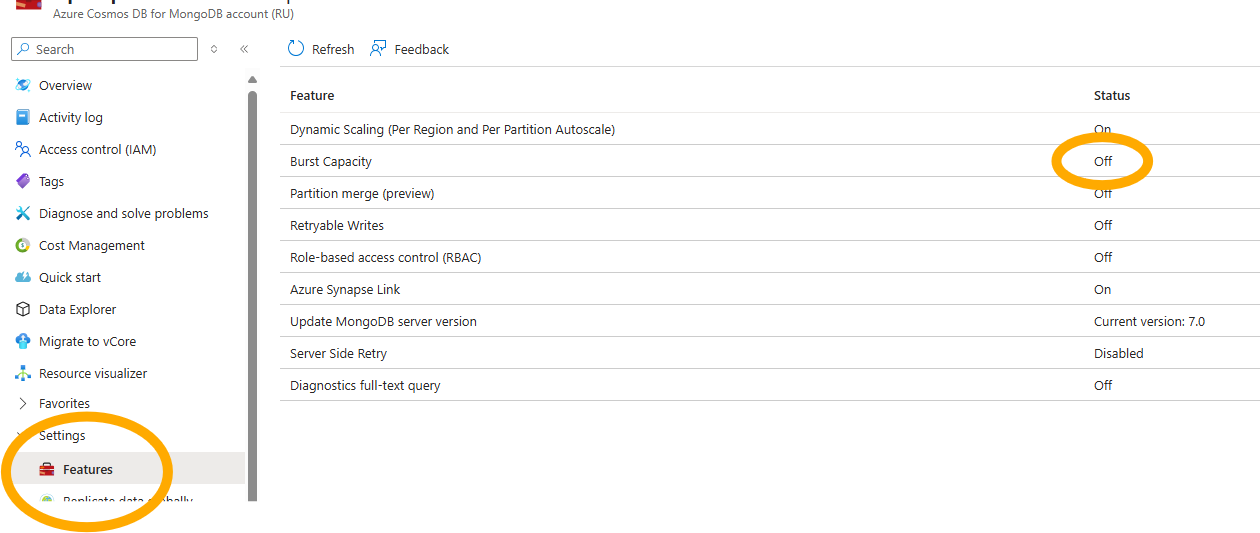
Burst Capacity
Cosmos MongoDB in Azure also supports Burst Capacity. This allows us to save up some compute during idle times for future execution.
This is disabled by default, but will help with throughput of periodic bursts in execution. This will not help if your typical throughput is more than the allocated RU/s of your MongoDb, but will make a slight difference if your throughput is inconsistent.
Server Side Retry
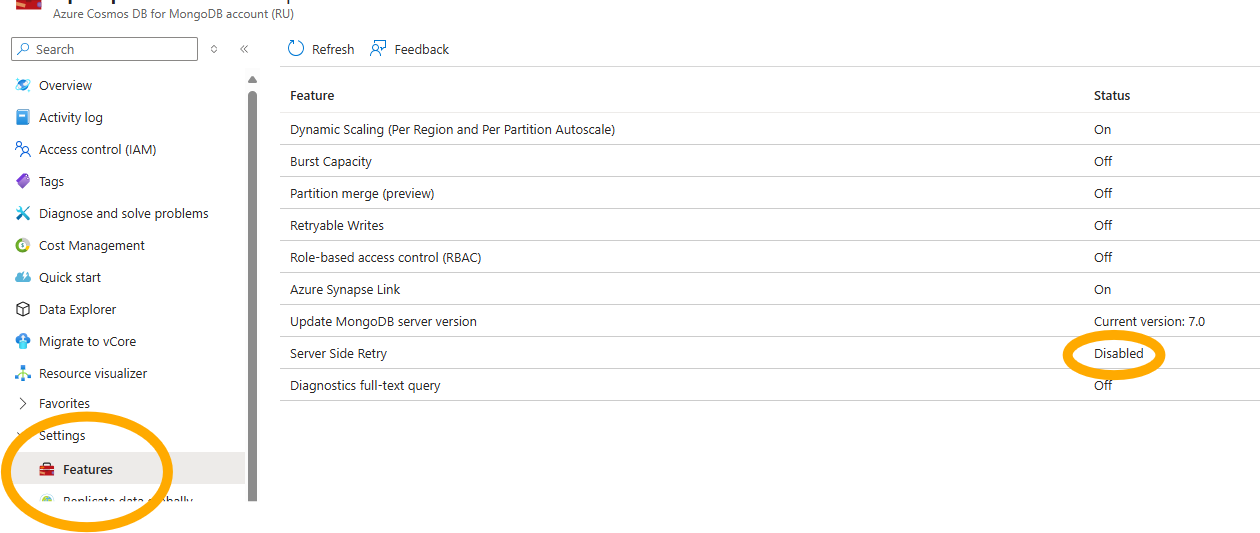
ProcessFactorial does have a robust retry facility, particularly around 429 (too many request) errors. However, during peak times, these errors may overwhelm your App Insight logs, drowning out legitimate errors. Turning on Service Side Retry on your Cosmos MongoDB instance will allow the Azure platform to silently retry 429 errors without reporting the errors back to the application or to App Insights.
Scaling Options - Azure Storage Account
Azure Storage Account auto scales and there is not much in the way of configuration to change this. In most scenarios, this is acceptable. However, it does not perform well when data is queried beyond using PartitionKey, RowKey or Timestamp. For large data sets (such as execution logs) it performs poorly.
It is technically usable for execution and reporting, but will have a performance impact. For smaller and more price sensitive customers, where throughput is not important, Azure Table Storage can be used. Most of the potentially impacted services are asynchronous in nature, so the impact may not be felt immediately. The exception to this is the Business Process Status Report, which could take multiple minutes to run if the data set is large.
Recommendation
Smaller customers are better suited to the SaaS Model if pricing of the Azure Cosmos Mongo DB is a concern