Hosted Model Deployment Troubleshooting
Async Errors
Due to the async nature of Azure Deployments, sometimes the Azure APIs return a successful response, even though the component has not completed initialising in the background. This means that the deployment script may attempt to make changes to a recently created component that is not ready yet.
The errors below are all examples of errors in this category. This will only happen during the initial install of the ProcessFactorial Any subsequent deployments will only deploy updated binaries and the occasional new component, so this should not happen after the initial install.
If these errors occur, simply rerun the deployment script. It will validate the deployment and continue.
Encountered an error (InternalServerError) from host runtime
Starting sub_deployFunctionAppArtifacts
An error occurred: {"Code":"BadRequest","Message":"Encountered an error (InternalServerError) from host runtime.","Target":null,"Details":[{"Message":"Encountered an error (InternalServerError) from host runtime."},{"Code":"BadRequest"},{"ErrorEntity":{"Code":"BadRequest","Message":"Encountered an error (InternalServerError) from host runtime."}}],"Innererror":null}
Encountered an error (ServiceUnavailable) from host runtime
Starting sub_createFunctionApps
An error occurred: Exception calling ".ctor" with "1" argument(s): "Stream was not readable."
An error occurred: {"Code":"BadRequest","Message":"Encountered an error (ServiceUnavailable) from host runtime.","Target":null,"Details":[{"Message":"Encountered an error (ServiceUnavailable) from host runtime."},{"Code":"BadRequest"},{"ErrorEntity":{"Code":"BadRequest","Message":"Encountered an error (ServiceUnavailable) from host runtime."}}],"Innererror":null}
Operation failed with error code '0'.
The process cannot access the file xxx.js
Starting sub_deployFunctionAppArtifacts
ZipArchiveHelper : The process cannot access the file '<PATH>\index-f49e057b.js' because it is being used by another process.
At C:\WINDOWS\system32\WindowsPowerShell\v1.0\Modules\Microsoft.PowerShell.Archive\Microsoft.PowerShell.Archive.psm1:697 char:30
+ ... sArchived = ZipArchiveHelper $subDirFiles.ToArray() $destinationPath  ...
+                 ~~~~~~~~~~~~~~~~~~~~~~~~~~~~~~~~~~~~~~~~~~~~~~~~~~~~~~~~~
    + CategoryInfo          : PermissionDenied: (C:\src\Apollo\N...dex-f49e057b.js:String) [Write-Error], IOException
    + FullyQualifiedErrorId : CompressArchiveUnauthorizedAccessError,ZipArchiveHelper

An error occurred: Exception calling ".ctor" with "1" argument(s): "Stream was not readable."
Cannot convert 'System.Object[]' to the type
This happens during the initial create of the APIM instance. Simply restarting the deployment will resolve this
`powershell
Starting sub_createAPIM
Validating...
Executing...
Processing APIM npobpperf010apim
Creating APIM npobpperf010apim in resource group npobpperf010core
An error occurred: Cannot convert 'System.Object[]' to the type 'Microsoft.Azure.Commands.ApiManagement.ServiceManagement.Models.PsApiManagementContext' required by parameter 'Context'. Specified method is not supported.
Operation failed with error code '0'.
Environment Connection Strings not updated
The connection strings or keys for certain function apps or storage components might not get seeded to the Key Vault during deployment. This can be identified by checking the Environment settings in the ProcessFactorial Portal.
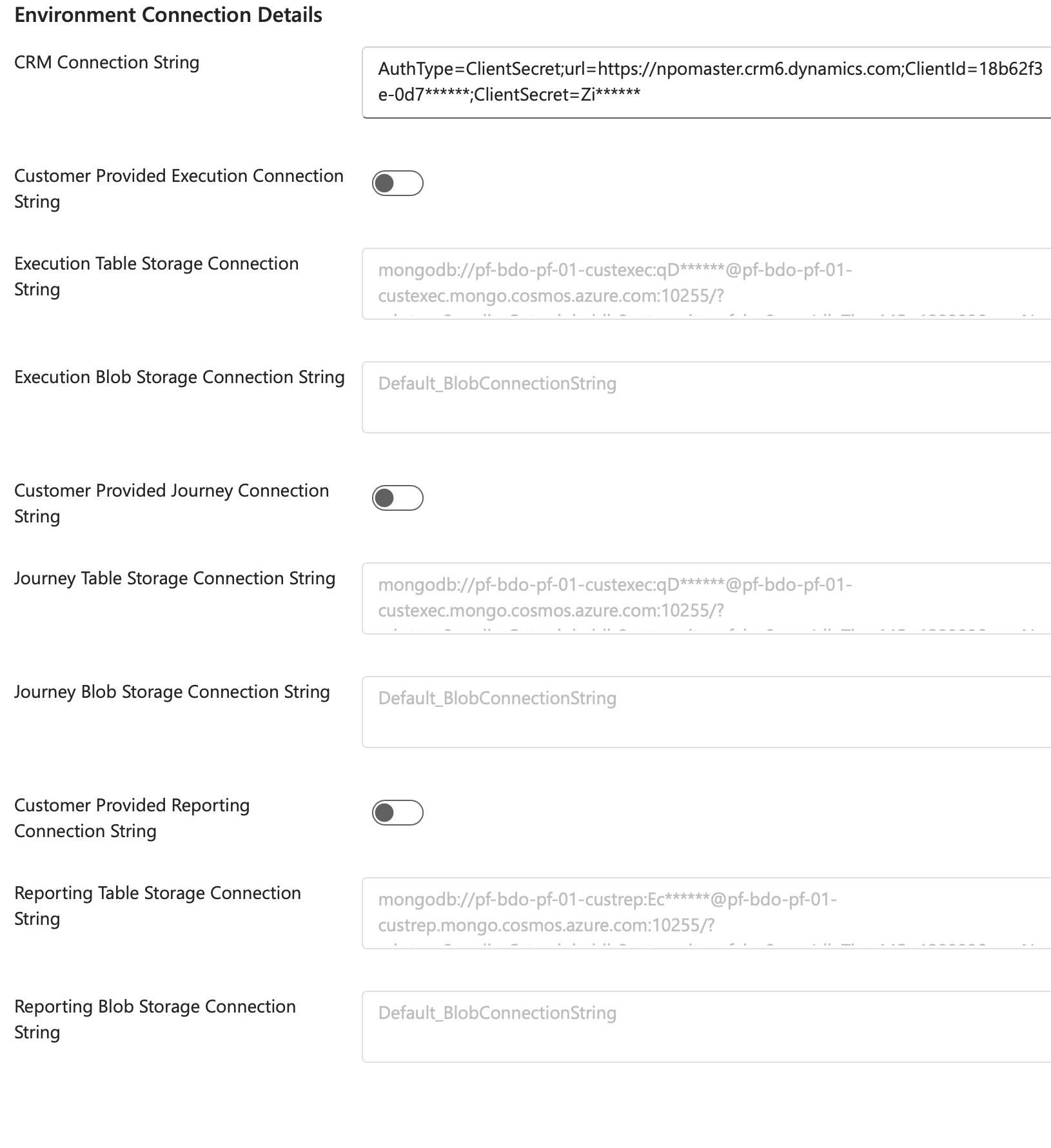
This arises if the seed data deployment failed (less likely) or was disabled in the deployment pipeline (more likely).
To resolve the problem, do the following:
-
If the
Deploy Seed Datastep failed:Rerun the deployment.
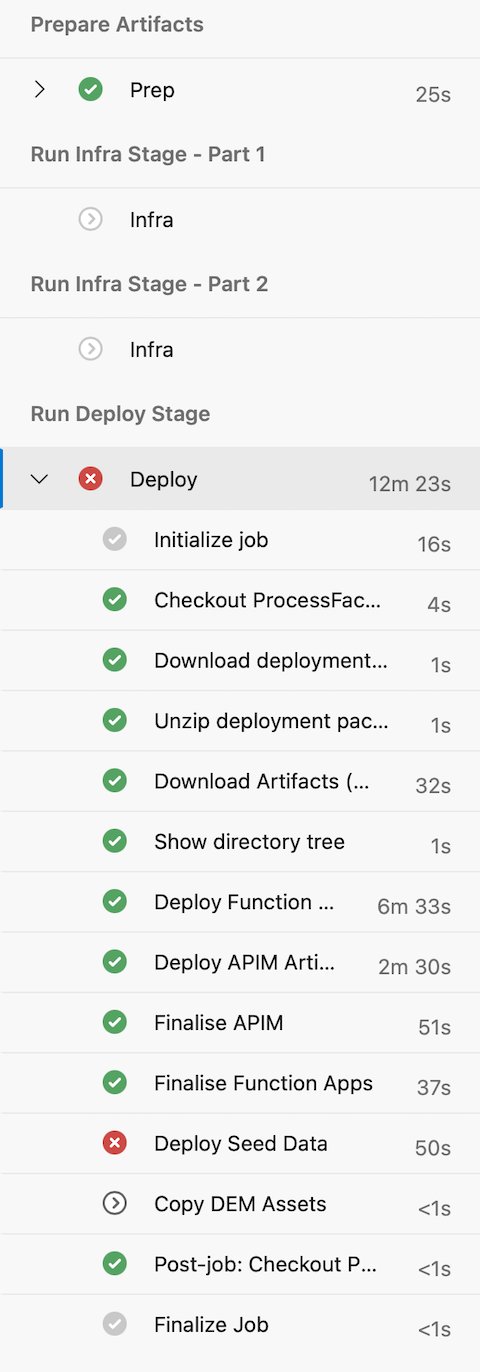
-
If the
Deploy Seed Datastep was disabled:This could happen due to two scenarios:
-
Check if the "seedData" endpoint in "executeEndpoints" was not enabled in the
customerconfig.json. This can be identified as the step missing in theRun Deploy Stagestage in the pipeline run.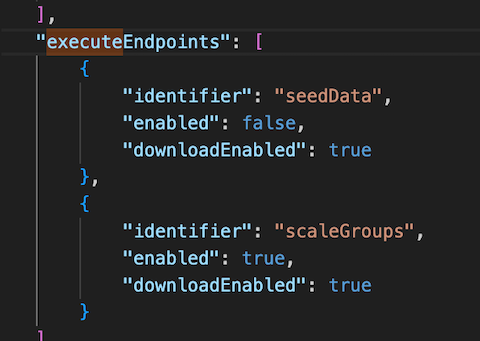
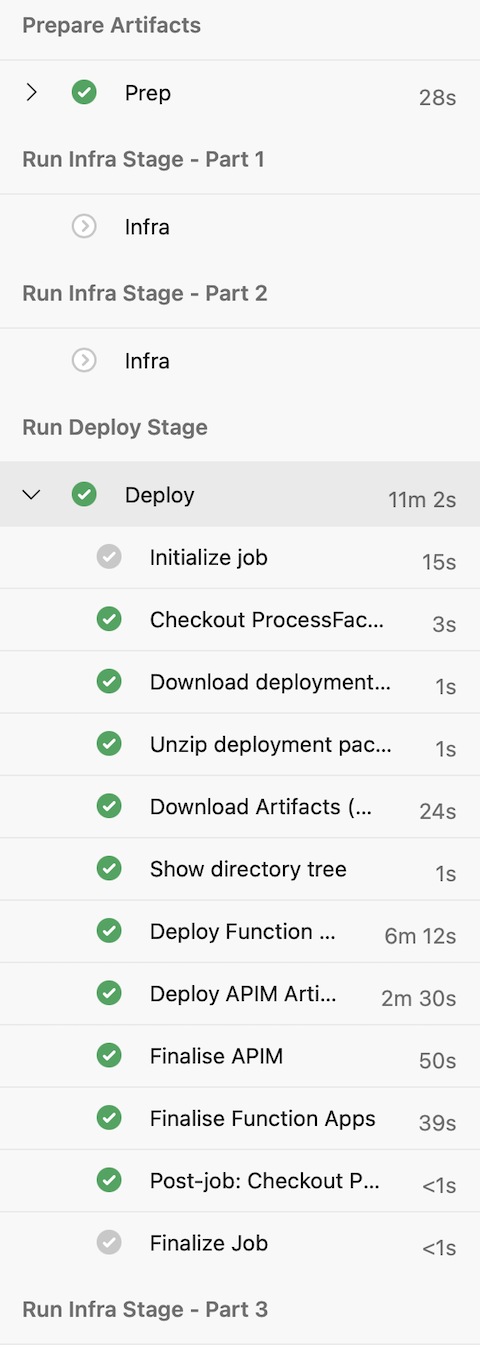
To resove the issue, enable it in the config file and run the deployment again.
-
Otherwise, check if the pipeline YAML file itself didn't have the step active (possibly the block being commented out) and enable it.
-